We are pleased to announce the release of Synthesizer V Studio 2 Pro 2.3.0.
This update introduces a redesigned phoneme system with language-independent X-SAMPA support, cross-lingual synthesis in French, German, Portuguese and Italian, and faster and more reproducible rendering.
Users of Synthesizer V Studio 2 Pro can access this update by relaunching the program, and follow the instructions that appear in the update dialog.
Voice Update and Cross-Lingual Synthesis Support for French, German, Brazilian Portuguese, and Italian
Many new features in this update require voice version 205. Please update your voices in the Dreamtonics Product Manager.
Currently, the v205 voice update is available for Dreamtonics voices. Support for partner voices will be announced at a later date.
We also added cross-lingual synthesis support for the following languages along with the Voice update:- French
- German
- Brazilian Portuguese
- Italian
Redesigned Phoneme System
Version 2.3.0 replaces the previous mixture of language-specific phonetic alphabets and custom X-SAMPA symbols with simplified, intuitive phonemes for each language. The new system resolves several longstanding phonetic inconsistencies and is easier to learn and memorize.
English largely retains the Arpabet symbols, with an additional ll for syllable-ending "l" and four experimental phonemes for a British accent. Japanese retains most of the romaji symbols, with the addition of -i, -u and -N for non-syllabic vowels. Mandarin, Cantonese, Korean and other languages previously based on X-SAMPA now use symbols that mimic their spelling or standard romanization.

Phonemes in existing projects are automatically converted to the new system. Reference tables mapping the previous symbols to the new symbols are available on our website.
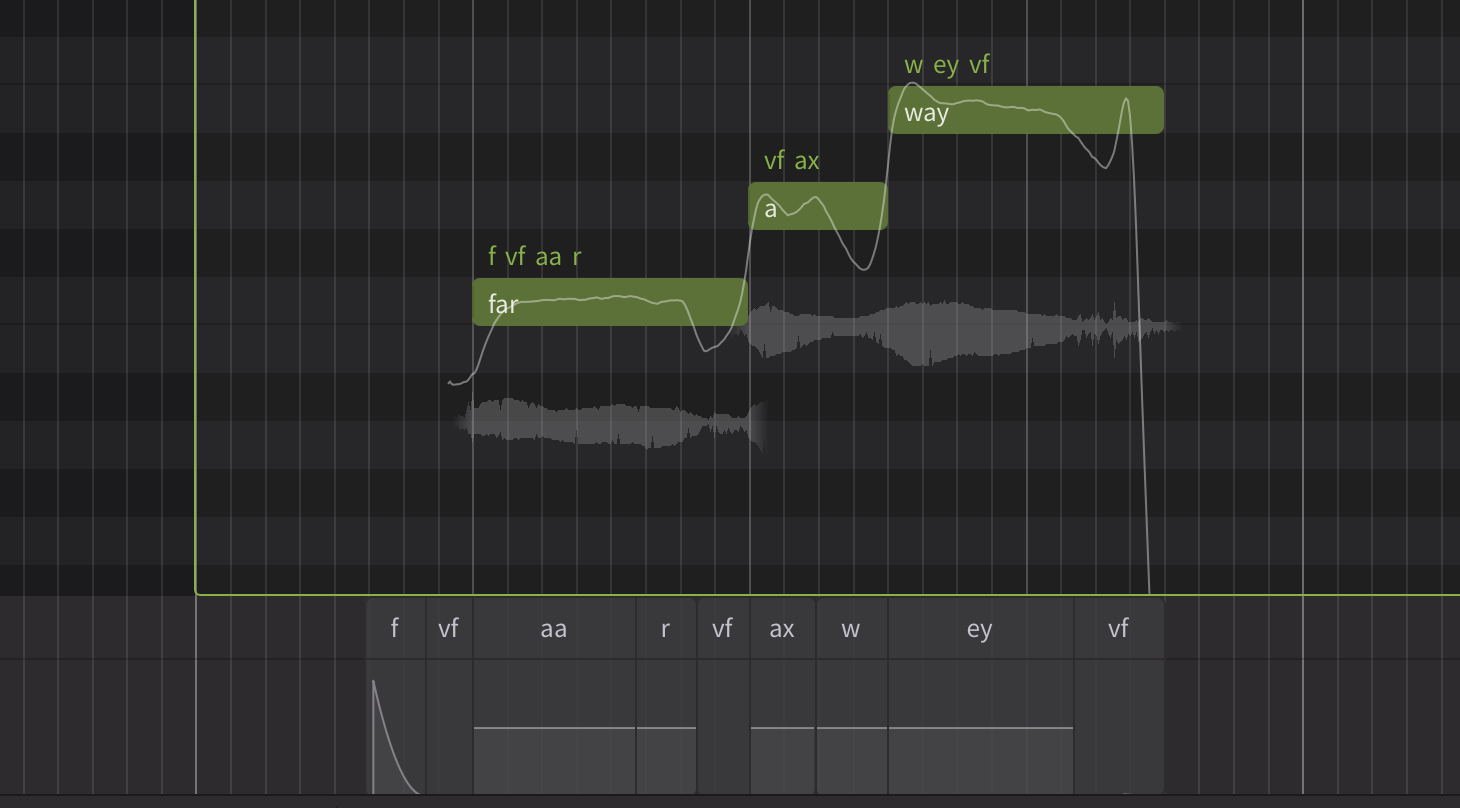
The new system also introduces a /vf/ phoneme for vocal fry in all languages, separate from the /cl/ phoneme for glottal closure. /vf/ can be inserted before or after a note, or between a vowel and a consonant.
Language-independent X-SAMPA Support
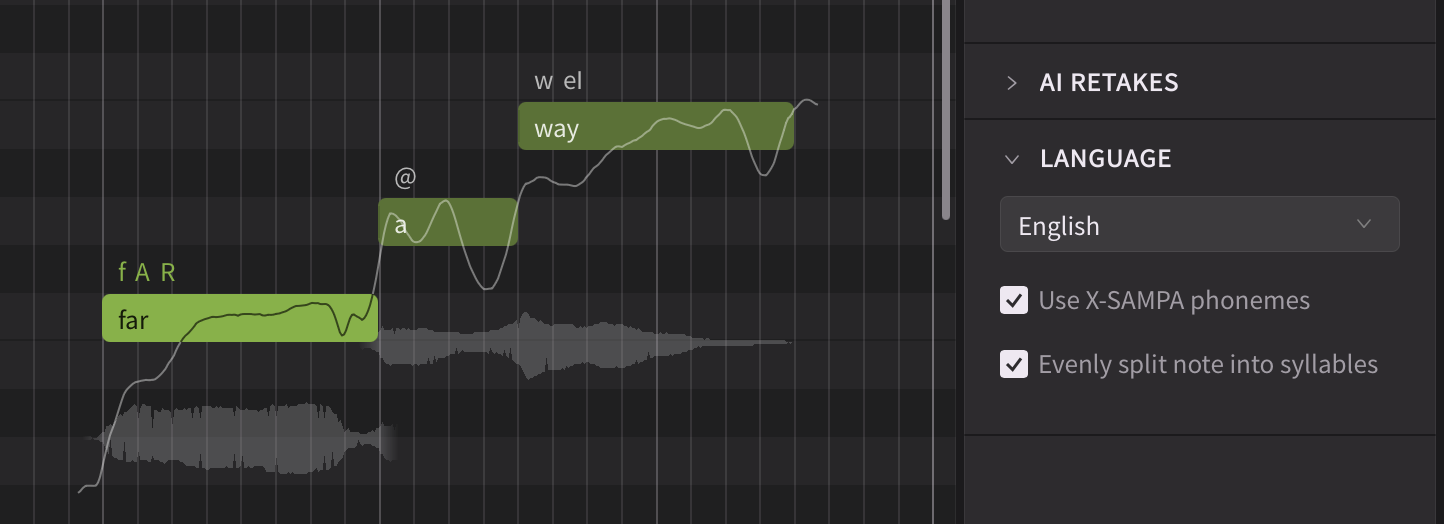
The Dictionary panel offers a similar option, allowing custom entries to be defined in either the simplified language-specific format or the X-SAMPA format. This is especially useful for simulating languages not natively supported by Synthesizer V.
A full list of supported X-SAMPA symbols is available on our website.
Phoneme Candidate Window
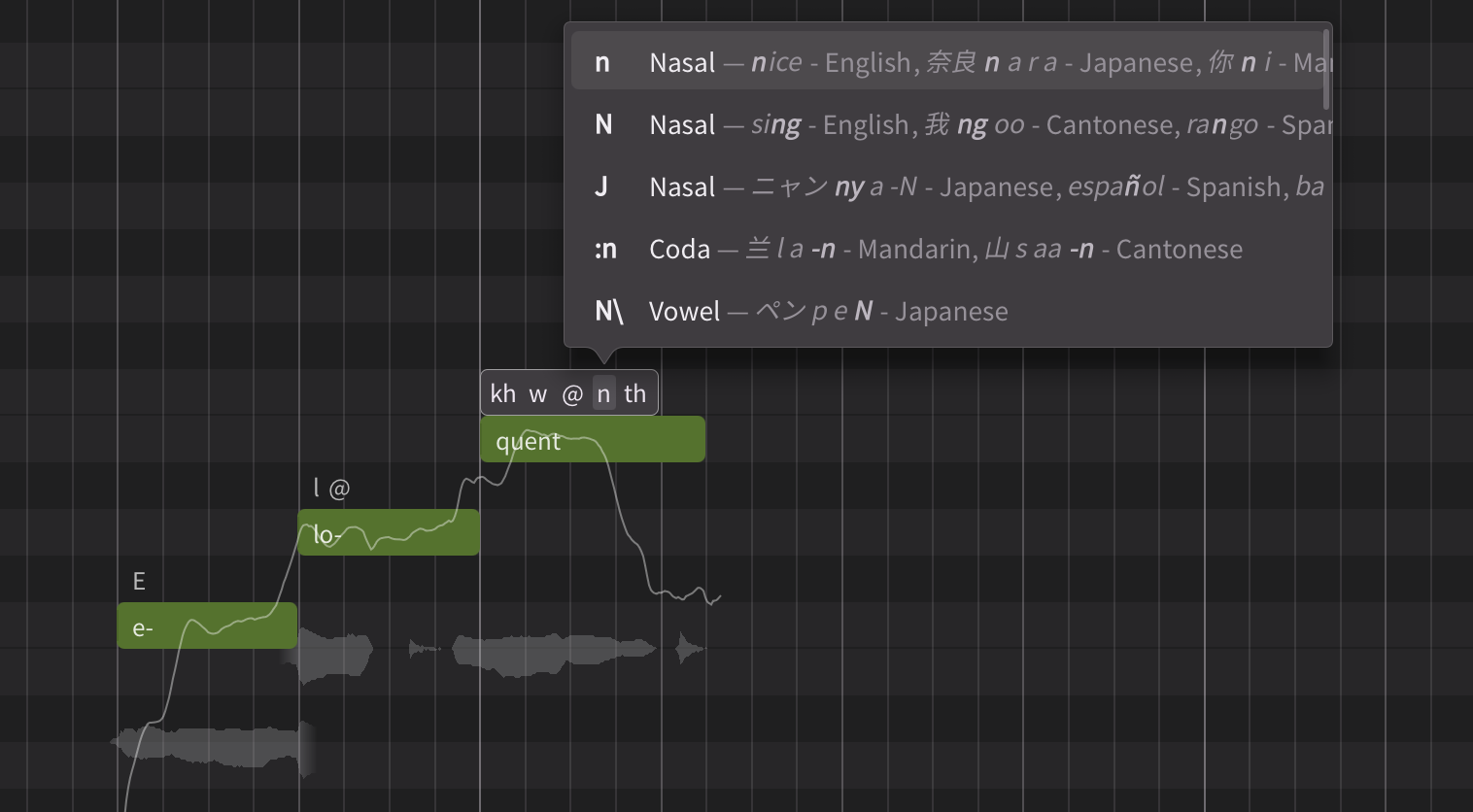
A new phoneme candidate window hovers above the input caret when editing phonemes. It lists the phonemes closest to the one being edited, matching results by both spelling and examples.
Faster and More Reproducible Rendering
A major backend refactoring reduces multithreaded rendering overhead on modern CPUs, including big-little core architectures. On processors with four or more cores, rendering is 30%–50% faster than the previous version. Projects with multiple voices also load significantly faster, as voices now load in the background.
The v205 voice update also resolves a long-standing rendering stability issue, where minor changes to note positions could cause significant variations in pitch and timbre, such as sudden volume dips across a subset of notes or inconsistent vocal quality depending on the rendering start position. Rendering results are now predictable and reproducible.
Other Improvements
Korean lyrics-to-phoneme conversion has been improved based on feedback from native speakers. This applies to existing voices and does not require a voice update.
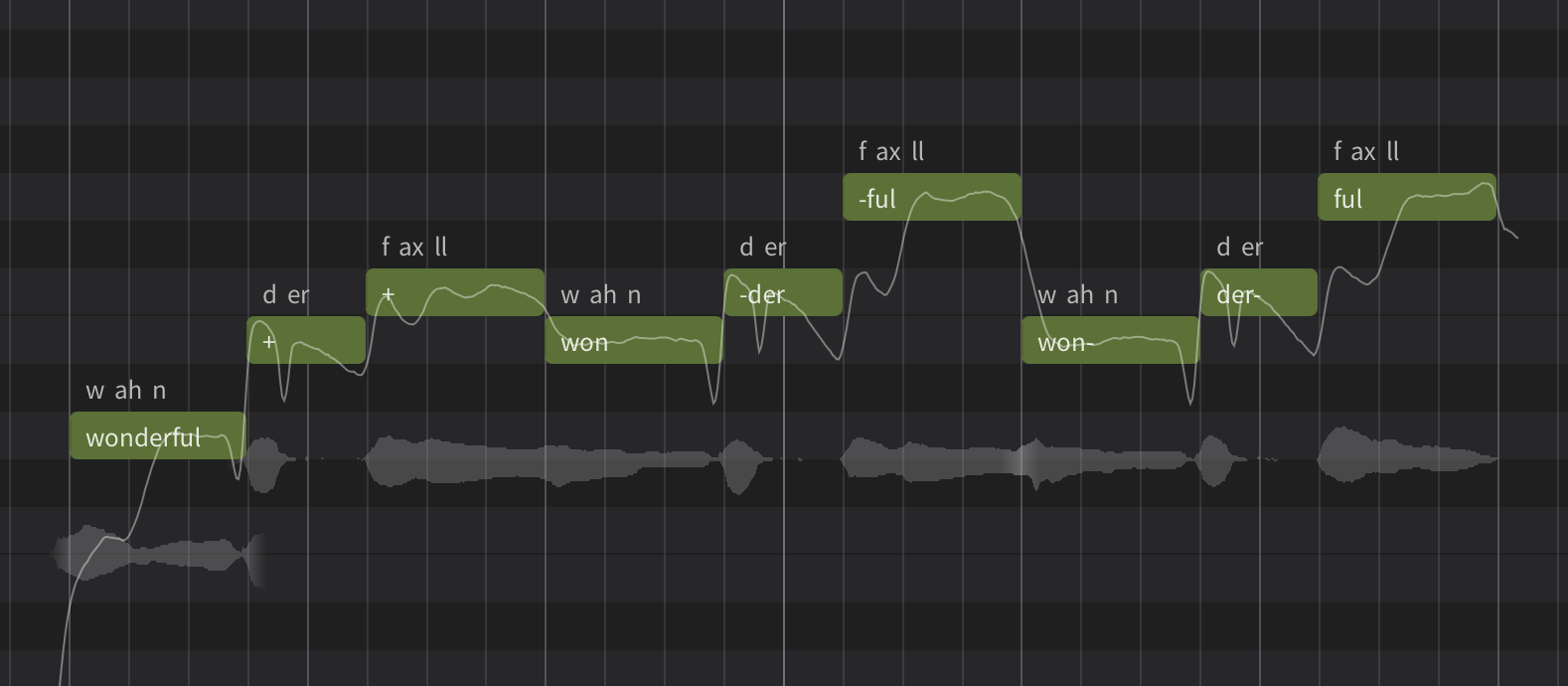
For non-CJK languages, a hyphen at the beginning or end of a note is now accepted as a syllable breaking indicator, in addition to the existing "+" mark.
Several features first introduced in Instrument X are now available in Synthesizer V, including the option to synchronize parameters with note movement and the ability to delete or duplicate multiple tracks at once.
Changelog
Synthesizer V Studio 2 Pro 2.3.0 (November 2, 2026)
New Features
- Overhauled the phoneme system: simplified/X-SAMPA switch, new vocal fry phoneme, and language-specific phoneme additions.
- Added cross-lingual synthesis support for French, German, Brazilian Portuguese, and Italian (v205 voice update required).
- Added real-time phoneme spell checking to the phoneme input box above notes.
- Added Phoneme Candidate Window listing phonemes similar to the user’s input.
- Added a new settings option to synchronize parameters with note movement.
- Added key shortcuts (default: up/down arrow keys) to move selected notes up/down by 1 semitone.
- Added to plugins a “Reset Window Size” command under View menu.
- Implemented a render cache rotation strategy and settings option to limit the disk usage.
- Added ARA support for LUNA.
Behavior Changes
- Reset existing pitch and parameters when applying Voice-to-MIDI conversion to an ARA-mapped group.
- Create the new track under the instrumental track when applying Voice-to-MIDI to an instrumental.
- Merged "Import Audio..." and "Import Project..." menu items.
- Renamed "Misc" menu to "Help" to enable native macOS command searching feature.
- Save loop status in the project files instead of the editor's settings file.
- Group duplication by holding Alt/Option and drag now follows the default group pasting behavior (linked vs unlinked) settings.
- Hide tools and mode options when the piano roll is collapsed.
- When inserting lyrics, treat consecutive spaces as a single note separator.
- When converting a version 1 project, split pitch curves at note boundaries.
- Default to saving the project inside the host when importing a project into the instrument plugin.
- Ignore file extension casing when importing files.
- Changed the key shortcut for navigating to the previous note to Shift + Tab on macOS.
- Added “*” as the default shortcut for starting a recording.
- Changed the internal handling of short gaps between notes.
Feature Enhancements
- Improved Korean grapheme-to-phoneme conversion.
- Improved multithread rendering efficiency.
- Reduced project load time by loading voices on a separate thread.
- Allow project data to be copy-and-pasted across standalone and plugin, across separate plugin instances, or across Synthesizer V and Instrument X.
- Improved MusicXML import:
- Added support for repeats.
- Added support for mid-measure tempo changes.
- Fill notes with the default lyrics if the score contains no lyrics.
- Added menu commands and key shortcuts for toggling loop mode and metronome.
- Automatically extend a group during MIDI recording.
- Allow individual automation points to be deselected with Ctrl/Command + Click.
- Show files overwrite warning when exporting audio files to the same destination.
- Improved the error display in the case of file/voice loading failure.
- Made the settings option to disable MIDI Input Device also available in the standalone.
- Allow multiple selection of tracks and editing track-level properties together.
- Optimized render cache to reduce the space consumption.
- Updated macOS app icon.
Bug Fixes
- Fixed crashes when closing the program during playback.
- Fixed crashes when executing "Remove Short Silences".
- Fixed crashes after removing the ARA plugin from REAPER for the second time.
- Fixed crashes when deleting the group/track/project during MIDI recording.
- Fixed position-dependent/non-deterministic rendering results (v205 voice update required).
- Fixed plugin loading failure due to Garageband's app sandboxing.
- Fixed project not rendering after reopening a project based on the ARA plugin.
- Fixed piano roll keyboard's preview tone being routed to the wrong plugin output channel.
- Fixed ghosted dialogs after removing the plugin.
- Fixed occasional unsynchronized playback when using the instrument plugin in Cakewalk.
- Fixed occasional unsynchronized playback between synced tracks and local tracks when using the ARA plugin in Cubase.
- Fixed several feature regressions introduced in version 2.2.1:
- Fixed broken compatibility with certain audio devices.
- Fixed crashes when reopening certain Studio One projects using the ARA plugin.
- Fixed phoneme conversion regressions when encountering certain Korean/accented latin characters.
- Fixed changes to application settings not being saved when multiple plugin instances are open.
- Fixed memory leakage when running the macOS ARA plugin in certain DAWs.
- Fixed data loss in macOS REAPER after setting up ARA and saving & reopening a project for the first time.
- Fixed Ctrl key unexpectedly triggering playback when using the ARA plugin on Windows.
- Fixed audio stutters when using the instrument plugin with a large buffer size.
- Fixed voice preset under Voice panel not resetting Unison parameters.
- Fixed displaced notes after finishing MIDI recording inside some note groups.
- Fixed pitch control points/curves going beyond the piano roll’s vertical limits after note transposition.
- Fixed cropped Settings and Product Manager windows when running inside ProTools with high DPI settings enabled on Windows.
- Fixed pitch control points/curves deviating from the intended positions when the note is clipped by the group's boundary.
- Fixed an audio group affecting the length of a note group from a different track when dragging it in the Arrangement view.
- Fixed dialogs and voice selector not conforming to the HiDPI scaling on Windows.
- Fixed menu commands getting stuck in a disabled state after canceling a dialog on macOS.
- Fixed several UX issues with the preset selector.
- Fixed "Prevent Group Overlap During Dragging" settings option affecting note creation.
- Fixed a display-only issue showing interrupted pitch curves.
- Fixed render cache not saving certain groups when the cache exceeds a certain size.